Blogger Templates

பல இணைய தளங்களிலிருந்து சேகரித்தவைகளை பலருக்கும் பயனாக அமையும் என்ற நோக்கம் கருதி இந்த - Blogல் பதிந்துள்ளேன்

- பொன்.சுதாகர்

Showing posts with label password recovery. Show all posts

Monday, November 22, 2010

MS - Office Password Breaker full version download

ms office password  breaker

Description:


Forgetting a password to your own Word document or Excel worksheet is surely annoying, but interfering with the office workflow causes substantial damage. If youÆre not in hurry, you can try guessing the password. If you have no time to play games, just unlock your documents and spreadsheets û guaranteed! No matter how long and complex your passwords are, Advanced Office Password breaker recovers Word documents and Excel spreadsheets within a limited timeframe. No need to perform lengthy attacks while a
40-bit encryption key can be crunched quickly and efficiently, and more importantly, with a guaranteed positive result.

Advanced Office Password Breaker unlocks documents created with Microsoft Office Word and Excel 97 and 2000, as well as documents saved with Microsoft Office XP and 2003 in Office 97/2000 Compatibility Mode.

Download Link
Advanced Office Password Breaker Pro 2.0.rar
Share:

Sunday, June 13, 2010

How to Hack a Window XP Admins Password (2.0)

        The most popular post I have ever made on this site is still to this day the article about how to hack a windows admin password. There have been many Windows updates after this post was released and I believe they fixed what was causing the vulnerability. A very nice person has just commented with a detailed explanation on how to hack the admin password on the new version of Windows. Here is it:

1.you should have ur own cmputer at home.or at least a computer from someone who can use a cd writer.

2.use nero 7 downloadable from net
3.create bootable disk.
4.bring the disk to your victims computer.
5.boot from it.(it mounts NTFS)
6.type “c:” enter
7.type “dir” enter
8.if you see WINDOWS ok fine.but if not you have to try other drive letters and do the same process (u cn try d: or e: until yo’ll find WINDOWS).
9.if succeed type “copy c:\windows\system32\config\SAM c:\folder” (this copy SAM & create folder in c:)
10.repeat but change “SAM” to “SYSTEM”.
11.remember use “c:” only if you seen WINDOWS in “c:” but if not use the drive letter that has.
12.get Offline Registry Editor from Pnordhal donloadable from net.
13.follow instructions.use it.it will blank your administrator password.
14.log on using administrator blank password.
15.non-domain users press ctrl+alt+del (press del twice, del only).type in.
16.have a copy of SAMInside.follow instructions using SAM file.(from internet)
17.export users to PWDump file.
17.have a copy of LOpthcrack 5
18.follow instructions.crack passwd using importing PWDump.browse file.follow instructions.that’s it.
19.You have ur administrator password.hack ur own PC.and bring back the original administrator password from users options.
20.blanking ur administrator pass disables ur access to “ENCRYPTED” files only, if u made one , but not all files.
21.if u dont want to blank ur password then do this at home.crack ur password at home.
22.some of these steps came from authors of mentioned products, except create boot disk part & changing back admin password.i discovered it myself.
23.thanks to the authors.
24.why use 4 application? you’ll know.
25.thanks to the crackers they are making hackers out of you.enjoy.
26.this is only for local computers.
Share:

Windows Password Recovery Bootdisk

Windows Password Recovery Bootdisk is a program that allows to retrieve Windows password hashes stored in Windows Security Accounts Manager (SAM), if you have lost your password and cannot logon to your Windows account. The bootable disk (CD or USB flash) is created with a help of Windows Password Recovery Bootdisk Creator and allows to remove password for the specific user or recover password hashes. Using the retrieved hashes, you can instantly recover original users passwords with a help of Windows Password Recovery Service.

Overview
General solution to the problem of forgotten Windows passwords include the following steps:

Step 1: Create the bootable disk for the password hashes retrival using Windows Password Recovery Bootdisk Creator.

Step 2: Boot from your bootable disk on the computer where you have lost the password. Via the bootdisk interface you can reset users passwords, print password hashes on the screen or save them on the disk. The password removal feature available for registered users only.

Step 3: Submit the password hashes extracted from your system to the Windows Password Recovery Service to recover original Windows users passwords.

If you don't have CD or USB flash you can create bootable floppy disk using old version of the program. You can download it using this link.

 You can download the recovery software from here: Windows Password Recovery Service

 Features and benefits
  1. Retrieves user names, LM and NTLM password hashes.
  2. Supports Windows NT / 2000 / XP / 2003 / Vista / Seven.
  3. The hashes retrieval program can run from the bootable CD or USB flash disk.
  4. Decrypts password hashes encrypted with syskey.
  5. Allows to remove password for the specific Windows user.
  6. Works with SATA / SCSI hard drives and NTFS file system.
 User interface
             To start retrieve Windows password hashes you need to create a bootable disk using Windows Password Recovery Bootdisk Creator. This utility has Wizard interface and allows you to create bootable CD ISO image or USB flash disk.


The process of creation of the bootable disk consists of several simple steps. First, the program will ask you to Insert a USB flash disk which you want to make bootable or choose to create the bootable CD ISO image. The SATA / SCSI hard drives support will be added to the bootable disk automatically. When the bootable disk has created you can use it on any computer, where you want to retrieve Windows password hashes or reset Windows users passwords.
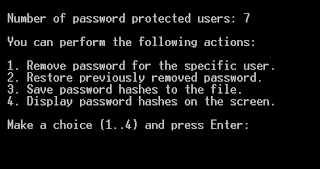


     After you configured your BIOS and rebooted, Windows Password Recovery Bootdisk utility will show you the following menu:


    When the bootdisk finished its work, you can recover original Windows users passwords with a help of Windows Password Recovery Service. 

 System requirements


           Windows Password Recovery Bootdisk can retrieve or remove password hashes for Windows NT / 2000 / XP / 2003 / Vista / Seven users, stored on the IDE hard drives as well as on the SATA / SCSI hard drives with FAT or NTFS file system. The bootdisk retrieves password hashes stored in the local computer's SAM only, Active Directory is not supported. You can create the bootable CD or USB flash disk with a help of Windows Password Recovery Bootdisk Creator which runs under Windows 9x / ME / NT / 2000 / XP / 2003 / Vista / Seven.
Share:

என்னை பற்றி...

My photo
Am Working as Assistant Professor in the Department of Information Technology at Sri Sairam Institute of Technology, Chennai.

முக்கிய செய்திகள்...

நாள்காட்டி

வானிலை


IP and Flag Counter

Wikipedia

Search results

QR Code Generator

All Conversion Widget

Recent Posts

Copyright © பொன். சுதாகர் | Powered by Blogger
Design by SimpleWpThemes | Blogger Theme by NewBloggerThemes.com & Distributed By Bloggertemplates4u